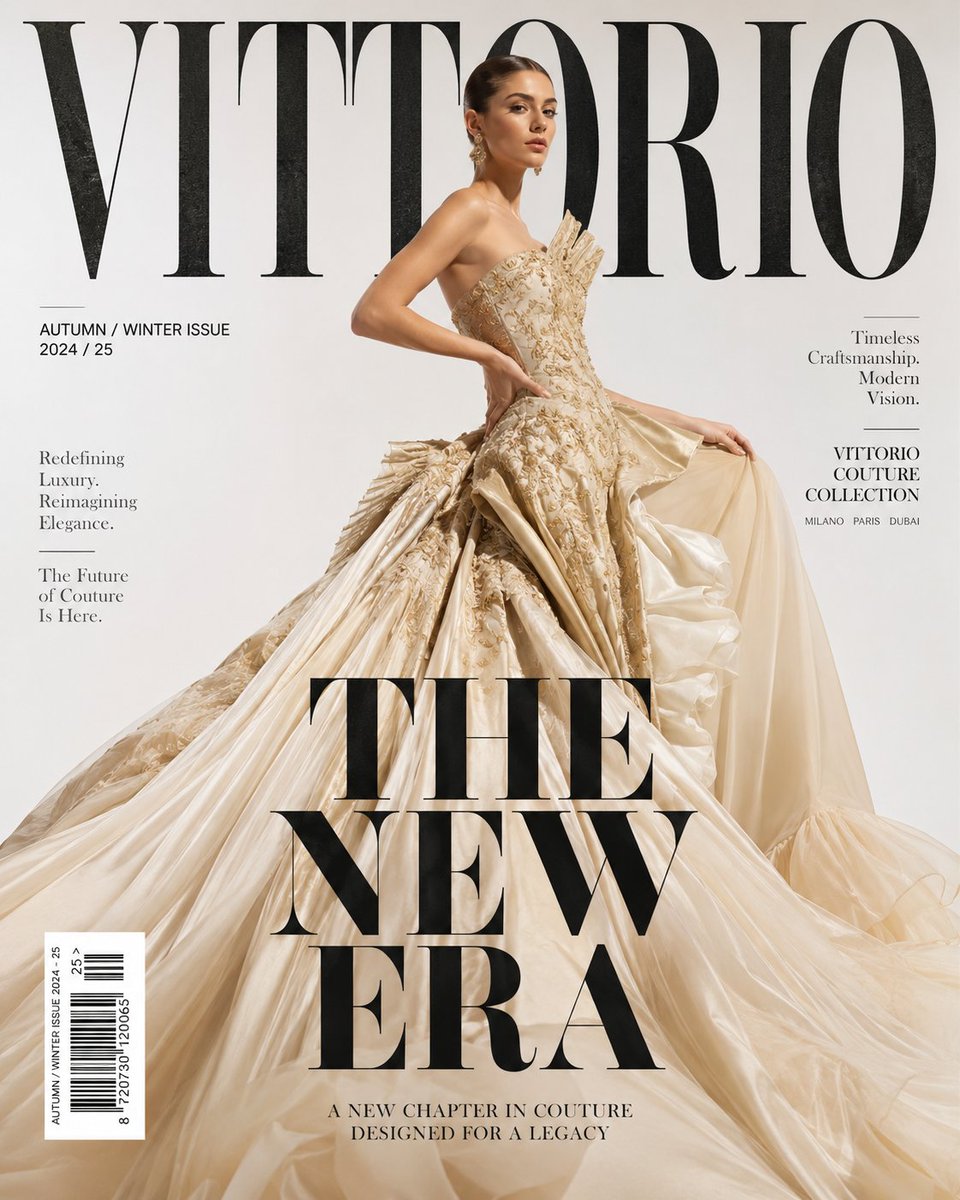
Luxury haute couture magazine cover
Character prompt · by RoseKhlifa · published 2026-06-09
Prompt
An ultra-luxury high fashion magazine cover for an elite couture brand named “{argument name="brand name" default="VITTORIO"}”. The cover features a breathtakingly beautiful female supermodel with flawless soft glowing skin, sharp elegant facial features, sleek high-fashion hair, and a confident royal expression. She is wearing an extravagant, voluminous {argument name="gown color" default="champagne-gold and cream"} haute couture gown with dramatic layered silk, rich intricate textures, and a cinematic flowing silhouette. The dress should feel exceptionally premium, exclusive, and fashion-week worthy. The model is standing in a powerful editorial pose — slightly turned sideways with one hand gracefully touching the waist while the other softly lifts part of the gown, creating fluid motion and elegance. The atmosphere feels like an elite, world-class Vogue-level fashion campaign. The background is a clean, minimalist, pristine matte white studio setting with soft, expensive high-key editorial lighting that casts gentle shadows. Behind the model, a giant, oversized bold typography logo “VITTORIO” spans across the top in a thick, heavy, premium serif font with absolute cinematic depth and sharp black ink texture integration, creating a striking contrast against the white backdrop. Add stylish fashion magazine cover elements seamlessly integrated: Main Headline: A massive, thick, bold black headline text reading "{argument name="headline" default="THE NEW ERA"}" dominating the lower half. Subheadings: Elegant, fine-lined charcoal-grey subheadings and minimalist layout accents. Editorial Details: Small luxury editorial text, barcode, and premium fashion issue details ("AUTUMN / WINTER ISSUE") precisely placed around the composition.Example output
Character
How to use this prompt
- 1. Copy the full prompt text above.
- 2. Paste it into your image model — Midjourney, DALL·E, Stable Diffusion, or GPT Image.
- 3. Replace the subject, style or lighting words with your own to adapt it.
- 4. Adjust aspect ratio and steps in your tool; the prompt itself is tool-neutral.
- 5. Iterate on one variable at a time so you can tell which change mattered.