Sci-fi action 3x3 storyboard project
Novel & Story prompt · by RoseKhlifa · published 2026-06-09
Prompt
{
  "type": "3x3 grid storyboard",
  "style": "3D CG anime style, cinematic lighting, highly detailed sci-fi environments",
  "character": {
    "description": "{argument name=\"character description\" default=\"young woman with short black hair and round glasses\"}",
    "outfit": "{argument name=\"suit design\" default=\"futuristic white and blue mecha plugsuit\"}"
  },
  "layout": {
    "grid": "3x3",
    "panel_count": 9,
    "panels": [
      { "position": "top-left", "scene": "Drinking traditional tea in a high-tech Japanese room with tatami mats" },
      { "position": "top-center", "scene": "Looking out a window at a futuristic city under attack, holding a tea bowl" },
      { "position": "top-right", "scene": "Looking at a red holographic warning screen displaying '{argument name=\"alert text\" default=\"ALERT 侵攻開始 敵性反応多数確認 ENEMY FORCE DETECTED\"}'" },
      { "position": "mid-left", "scene": "Kneeling on the tatami mat in a ready stance" },
      { "position": "mid-center", "scene": "Close-up portrait, touching headset with a serious expression" },
      { "position": "mid-right", "scene": "Standing in a dark metallic hangar, fully equipped" },
      { "position": "bottom-left", "scene": "Dashing through a war-torn battlefield with flying debris" },
      { "position": "bottom-center", "scene": "Dynamic mid-air combat, attacking a mecha with a {argument name=\"weapon\" default=\"glowing blue energy blade\"}" },
      { "position": "bottom-right", "scene": "Epic standoff, facing a {argument name=\"enemy\" default=\"massive enemy mecha\"} in a ruined landscape" }
    ]
  }
}
Example output
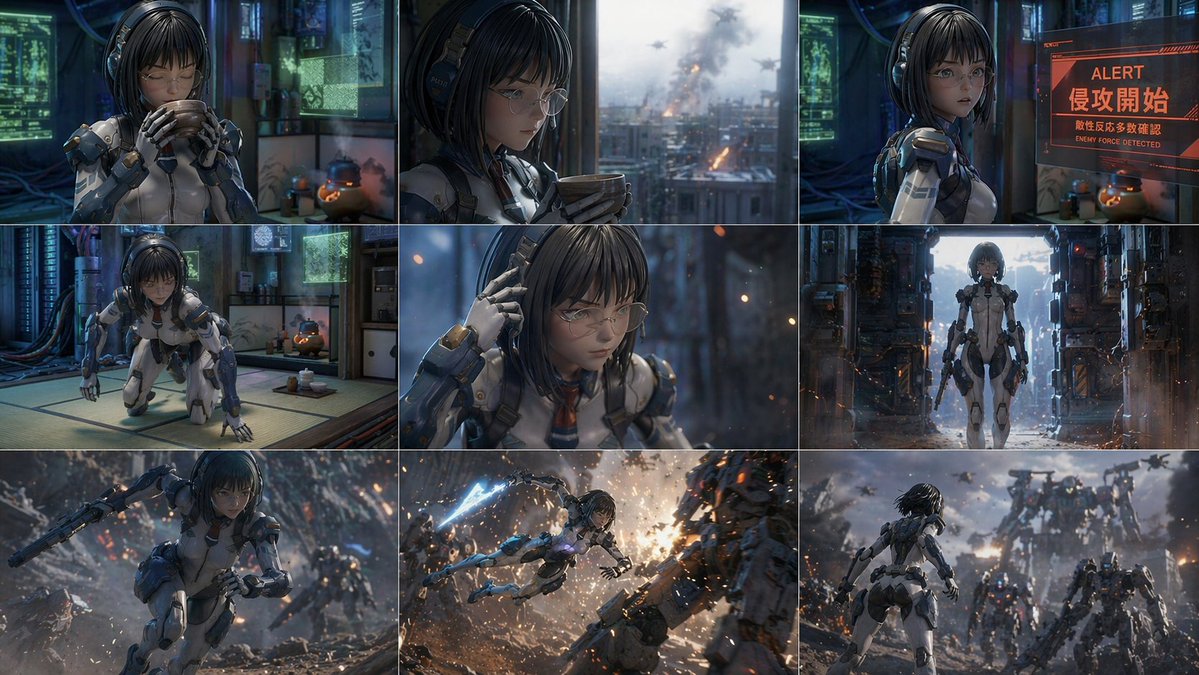
Novel PromotionSci-Fi Tech
How to use this prompt
- 1. Copy the full prompt text above.
- 2. Paste it into your image model — Midjourney, DALL·E, Stable Diffusion, or GPT Image.
- 3. Replace the subject, style or lighting words with your own to adapt it.
- 4. Adjust aspect ratio and steps in your tool; the prompt itself is tool-neutral.
- 5. Iterate on one variable at a time so you can tell which change mattered.