Luxury perfume splash advertising
E-commerce prompt · by RoseKhlifa · published 2026-06-09
Prompt
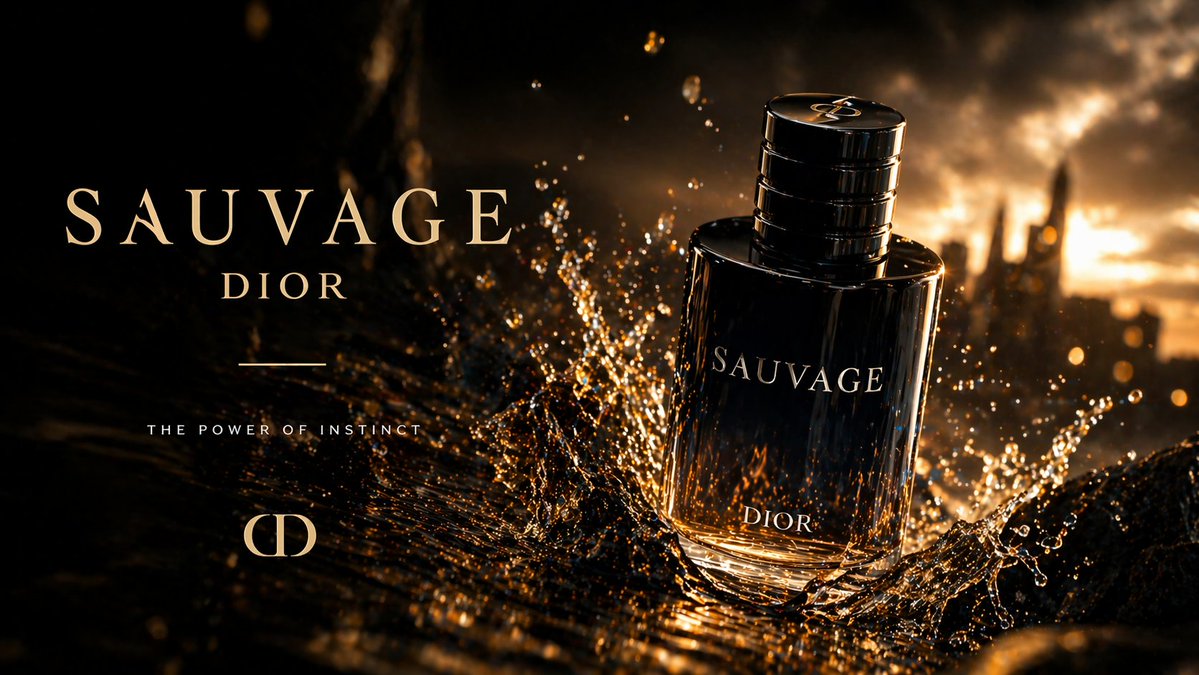
Create a luxury cinematic fragrance advertisement for a dark glass men's perfume bottle labeled {argument name="brand name" default="DIOR"} and {argument name="product name" default="SAUVAGE"}. The composition is a widescreen premium product shot with the bottle placed slightly right of center, standing upright on a glossy wet black surface, angled subtly toward the viewer. The bottle is deep smoky navy-black transparent glass with a reflective metallic cap featuring circular ridges, elegant serif lettering on the front, and warm amber light glowing through the base. Surround the bottle with one dramatic splash of liquid frozen in motion, with countless sparkling golden droplets and streaks exploding upward and outward around the lower half of the bottle. Use a dark, moody, high-contrast background with a blurred rocky or citylike silhouette and glowing sunset light in the distance, dominated by black, bronze, amber, and gold tones. On the left side, add refined luxury ad typography in a spacious layout: a large serif headline reading {argument name="headline text" default="SAUVAGE"}, a smaller serif brand line below reading {argument name="subheadline text" default="DIOR"}, one thin horizontal divider line beneath, and a small uppercase sans-serif tagline reading {argument name="tagline" default="THE POWER OF INSTINCT"}. Add a minimalist luxury monogram mark near the lower left. Emphasize glossy reflections, sharp bottle edges, realistic liquid physics, sparkling highlights, cinematic backlighting, shallow depth of field, and premium high-end beauty campaign styling.Example output
E-Commerce Marketing
How to use this prompt
- 1. Copy the full prompt text above.
- 2. Paste it into your image model — Midjourney, DALL·E, Stable Diffusion, or GPT Image.
- 3. Replace the subject, style or lighting words with your own to adapt it.
- 4. Adjust aspect ratio and steps in your tool; the prompt itself is tool-neutral.
- 5. Iterate on one variable at a time so you can tell which change mattered.